



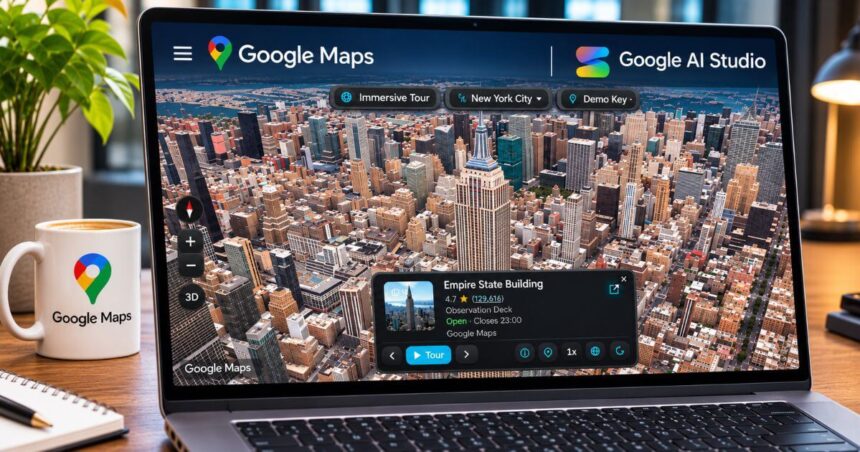
Google has upgraded AI Studio with a new Google Maps Platform integration that allows users to build location-based applications simply by describing what they want. Instead of manually configuring multiple APIs, setting up credentials and connecting different services, developers can now ask Gemini to create a Maps-powered application through a text prompt.
Announced on November 9, the integration brings Google Maps Platform directly into Google AI Studio. It can help users create applications such as store locators, route planners, interactive city tours and environmental monitoring tools, with a live preview available inside the development environment.
The update is aimed at making app prototyping faster, particularly for developers and people who want to experiment with location-based ideas without dealing with complicated initial configurations.



How Google Maps Integration Works In AI Studio
you can now build with google maps platform in AI Studio 🗺️📍
go from idea to app powered by @googlemaps in minutes!
what’s new:
– 1-click setup
– create maps apps just by describing your idea, gemini does the rest
– build with map tiles, places, weather, routing, 3D… pic.twitter.com/d9jCxptYhS
— Google AI Studio (@GoogleAIStudio) November 9, 2026The process starts with a simple prompt. Users can open Google AI Studio, describe the application they want to build and let Gemini generate the required application. For example, someone could ask Gemini to build a store locator that displays nearby branches, allows users to search locations and shows their opening hours. Similarly, a prompt describing a multi-stop road trip planner can help generate an application that calculates routes and displays them on an interactive map.
AI Studio automatically identifies the mapping requirements and helps enable the relevant Google Maps services. It can also securely configure the required credentials and connect an existing Google Cloud project. Once the application is generated, users can see a live, interactive preview within AI Studio. This makes it easier to test the experience, identify issues and refine the application without constantly switching between development tools.
Google Maps Features Available in AI Studio

The integration brings several Google Maps Platform capabilities into the AI Studio environment.
Maps: Developers can create custom map interfaces, add dynamic data overlays and build interactive 3D city experiences. Photorealistic 3D maps can also be used for applications such as virtual city tours and landmark exploration.
Places: The Places API can power local search experiences, store locators, place profiles and location-based recommendations. Developers can build tools that help users discover nearby businesses and explore relevant location information.
Routes: The Routes API can calculate journeys, support multi-stop itineraries and help create commute planners. It can also be used for applications that manage routes for delivery services or mobile businesses.
Weather and Environment: Google also highlights environmental applications, including air quality monitoring, pollen alerts and weather-related tools. The availability of individual services depends on the API access and project configuration being used.
Street View Static is also included in the broader Google Maps Platform API offering available through the new-user setup. However, developers should check the supported API list for their particular demo key or connected Cloud project.
Google Adds Ready-Made Examples
To help developers understand what they can create, Google has added working examples to the AI Studio gallery. One example is City Immersive Tour, which uses interactive 3D maps, custom camera paths and location markers to showcase popular landmarks. Users can explore the experience and customise it for their own projects.
Another example is Pet Grooming Route Optimizer. It uses the Routes API to calculate multi-stop journeys for mobile service businesses. The tool can consider appointment timings, priority stops and driver shift limits while displaying route timelines.
Google has also showcased a Store Locator and Near Me Finder, which allows users to search for branches, filter locations by distance and check details such as opening hours.
These examples can be explored and remixed, giving developers a starting point rather than requiring them to build everything from scratch.
Free Usage and API Limits Explained
One of the biggest advantages is that developers can experiment without immediately setting up a paid Google Cloud billing account. Google AI Studio provides access to a Maps Demo Key for prototyping. The demo setup offers a daily allowance of up to 100 API calls per day for each supported API. These quotas reset every 24 hours, and users do not need to enter credit card details to get started.
However, the free setup is intended for experimentation and prototyping, not unrestricted production use. Some API features and user-generated content, such as place photos and reviews, may not be available through the demo configuration.
Developers who want to launch their applications with higher usage limits can connect a Google Cloud billing account or link an existing billed project. This provides access to production-grade quotas and standard Google Maps Platform pricing, which also includes recurring monthly free usage.
Google AI Studio Maps Integration: Key Details
| Feature | Details |
|---|---|
| Platform | Google AI Studio |
| AI Assistant | Gemini |
| Maps Integration | Google Maps Platform |
| Development Method | Natural-language prompts |
| Mapping Features | Interactive maps and 3D cityscapes |
| Places | Local search and place information |
| Routing | Multi-stop routes and journey planning |
| Environment | Weather, air quality and pollen tools, subject to API access |
| API Setup | Automated configuration and credential management |
| Free Usage | Up to 100 calls per day per supported API |
| Billing | Not required for demo-key prototyping |
| Production Access | Requires a billed Google Cloud project |
Conclusion
Google’s latest AI Studio update makes building location-aware applications considerably more approachable. By bringing Maps Platform tools directly into the prompt-based development environment, Google is reducing the amount of manual configuration involved in getting a prototype running.
The free demo quotas also give developers an opportunity to test ideas before committing to a paid setup. However, production applications will still need an appropriate Google Cloud billing configuration and access to the required APIs. For developers experimenting with Gemini-powered applications, this integration could save considerable setup time and make it easier to turn simple ideas into functional Maps-based tools.
Follow Us: Facebook | X | Instagram | YouTube | Pinterest