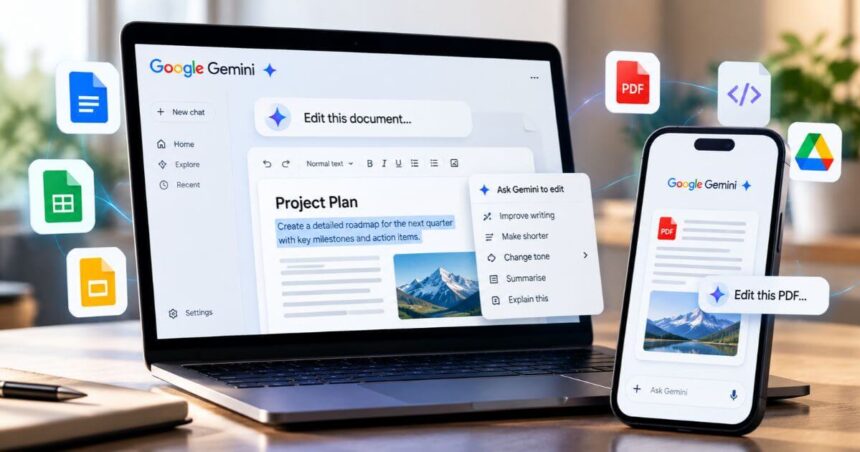
Google is making Gemini more useful for people who regularly work with documents, spreadsheets and presentations. The company has introduced richer file editing features that let users generate, preview and modify supported files directly inside a Gemini conversation. This means users no longer need to download every file and open another application just to make a few changes.
The update, announced on October 29, 2026, builds on Gemini’s existing file-generation capabilities introduced in April. Earlier, users could ask Gemini to create a document or spreadsheet and download the result. However, correcting mistakes or changing specific sections often meant moving to another editor. The new feature brings more of that work into the original conversation.
The update supports PDFs on both the web and mobile. Google Docs files, spreadsheets, presentations, Markdown, plain-text files and code can be edited through Gemini on the web. This difference is important for users who prefer working from their smartphones.



Gemini Can Now Edit Documents Without Leaving The Chat
Gemini users can generate a file, preview the result and make changes without leaving the conversation. The preview can be expanded to full screen, making it easier to review longer documents and complex layouts.
Users can make edits manually or ask Gemini to revise selected text. They can highlight a particular passage and provide instructions for changing its wording, explaining a concept or improving a section. This gives users more control over individual parts of a file instead of having to regenerate the entire document.
For example, someone creating a study guide can ask Gemini to turn handwritten lecture notes into a PDF. After reviewing the document, they can select a passage and request changes. The assistant can then revise the relevant content within the same workflow.
The feature can also help when working with tables and structured information. Users can select relevant content and ask Gemini to turn it into a chart. They can then inspect the updated result before deciding whether it meets their requirements.
However, AI-generated changes still need to be checked. This is particularly important when working with financial figures, technical information or other content where accuracy matters.
PDF Editing Comes To Gemini On Mobile
One of the key parts of this update is PDF support on mobile devices. Gemini users can preview and edit PDFs through the mobile app, as well as through the web interface.
This makes the feature useful for students, professionals and people who frequently review documents while travelling. Users can make changes to supported PDF files without necessarily moving to a separate editing application.
The mobile experience is more limited when it comes to other file types. Google Docs, Sheets, presentations, Markdown files, plain-text documents and code are supported for in-chat editing on the web, but not through the announced mobile editing experience.
For users who create different types of files, the web version currently offers broader editing support. Those who mainly work with PDFs can use the feature on their phones.
Which File Formats Does Gemini Support?
Google is extending Gemini’s existing file-generation workflow with in-chat previews and editing controls. However, the formats available for editing should not be confused with every format Gemini can generate or process.
The supported editing formats announced in this update include PDFs, Google Docs, spreadsheets, presentations, Markdown, plain text and code. PDFs work on both the web and mobile, while the other listed editing formats are limited to the web experience.
The ability to edit selected content is another useful addition. Instead of asking Gemini to rewrite an entire document, users can focus on a specific paragraph, table or section. This could make the editing process more convenient when only a few changes are required.
Google has also highlighted workflows that combine text and visual input. Users can create a document from source material, inspect the preview and then explain what they want changed. The aim is to make document creation and refinement part of one continuous conversation.
Gemini File Editing: Availability And Requirements
The new editing capabilities are available to users with personal Google accounts and Google Workspace customers in supported regions and languages where Gemini is available. Google’s announcement does not introduce a separate subscription requirement for this feature. However, access to individual Workspace applications and their features may depend on the user’s account and eligibility.
The rollout builds on Gemini’s file-generation feature, which Google introduced in April. The latest update focuses on what happens after a file is created. Users can now review the output and make further changes directly within the Gemini interface.
For people who frequently use AI to prepare reports, study materials, presentations or code, this could reduce the number of steps involved in completing a task. It also makes Gemini more useful as an editing assistant rather than simply a tool for generating a first draft.
Google Gemini File Editing: Key Specifications
| Feature | Details |
|---|---|
| Feature | In-Chat File Preview And Editing |
| Announcement Date | October 29, 2026 |
| Platform | Gemini Web And Mobile App |
| PDF Editing | Web And Mobile |
| Google Docs Editing | Web |
| Spreadsheet Editing | Web |
| Presentation Editing | Web |
| Markdown Editing | Web |
| Plain-Text File Editing | Web |
| Code Editing | Web |
| Editing Options | Manual Editing And AI-Assisted Changes |
| Selected-Text Editing | Supported |
| Full-Screen Preview | Supported |
| Account Availability | Personal Google Accounts And Eligible Workspace Customers |
| Subscription Requirement | No New Subscription Requirement Announced |
Conclusion
Google’s latest Gemini update makes document creation and editing more convenient by bringing both processes into the same conversation. Users can generate files, preview them and refine selected sections without repeatedly switching between applications.
PDF editing on mobile is particularly useful, although the web version currently supports a wider range of file formats. The feature could save time for students, professionals and anyone who relies on Gemini to create documents or other work files.
The update does not remove the need to review AI-generated content. Users should still check the final document, especially when accuracy is important. However, bringing previews and editing controls directly into Gemini is a practical improvement that makes the assistant more useful beyond generating text.
Follow Us: Facebook | X | Instagram | YouTube | Pinterest