By using this site, you agree to the Privacy Policy and Terms of Use.
Accept
TechotalesTechotalesTechotales
  • HOME
  • SMARTPHONES
  • BUSINESS
  • AI
  • AUTOMOBILE
  • TECHNOLOGY
  • TELECOM
  • WEARABLES
  • GADGET
  • TABLETS
  • FINANCE
  • APPS
  • TECH NEWS
  • GAMING
  • APPLIANCES
  • AUDIO
  • SOCIAL
  • LAPTOPS
  • CRYPTO
  • ABOUT US
  • DISCLAIMER
  • PRIVACY POLICY
  • CONTACT
  • TERMS OF USE
Copyright © Techotales | All Rights Reserved
Reading: Steps To Transform Any Image Into Video With Google Gemini Photo-To-Video Feature
Notification Show More
TechotalesTechotales
  • HOME
  • SMARTPHONES
  • BUSINESS
  • AI
  • AUTOMOBILE
  • TECHNOLOGY
  • TELECOM
  • WEARABLES
  • GADGET
  • TABLETS
  • FINANCE
  • APPS
  • TECH NEWS
  • GAMING
  • APPLIANCES
  • AUDIO
  • SOCIAL
  • LAPTOPS
  • CRYPTO
Follow US
  • ABOUT US
  • DISCLAIMER
  • PRIVACY POLICY
  • CONTACT
  • TERMS OF USE
Copyright © Techotales | All Rights Reserved.
Techotales > Blog > Technology > Steps To Transform Any Image Into Video With Google Gemini Photo-To-Video Feature
TechnologyTech News

Steps To Transform Any Image Into Video With Google Gemini Photo-To-Video Feature

Learn how to use Google Gemini’s photo-to-video feature to animate illustrations, transform photos into motion clips, and visualize creative ideas.

Prateesha Singh
Last updated: September 26, 2025 11:50 AM
Prateesha Singh - Content Writer
Share
Image Into Video With Google Gemini
SHARE

Content creation just got a major upgrade. Google’s Gemini now lets you turn any image into an 8-second video clip with sound. This includes sound effects, background noise, and even speech. You just need an image or a simple return to get started.

Contents
  • Method 1: Animate Illustrations With Gemini
  • Method 2: Turn Photography Into A Motion Picture
  • Method 3: Articulate And Artistic Vision

Finding new ways to create content and engage with audiences around the world has become much easier with this tool.

Method 1: Animate Illustrations With Gemini

Turn an illustration into an animation for more compelling visuals, presentations, newsletters, and videos. For example, take a simple illustration of a bicycle in a desert scene. Use this prompt:


More From Techotales

Moto Pad 70 Groove Features Pricing
Moto Pad 70 Groove Launched In India With 12.1-Inch 2.5K Display, 9 JBL Pro Speakers: Price And Features
July 31, 2026
SarvamAI
India’s Sarvam AI Challenges OpenAI And Google With Cheaper Trillion-Parameter AI Model
July 31, 2026
Amazon Great Freedom Sale 2026
Amazon Great Freedom Sale 2026: Start Date, HDFC Bank Offers, Cashback And Price Crash Store
July 30, 2026

“The bicycle starts moving through the desert landscape, creating smooth motion that keeps the original art style intact.”

Now what happens: This static image comes alive. The bicycle begins moving through the desert landscape, creating a smooth motion that preserves the original art style intact. Also, check the 10 best Navratri prompts.

Things To Remember

  • Videos are generated in 16:9 landscape orientation
  • The image may get padded with a black border if your image has a different aspect ratio
  • It can sometimes take more than one try, but don’t be discouraged
  • Prompting takes practice, and video models are also learning and improving

Method 2: Turn Photography Into A Motion Picture

Transform photos into lifelike video clips, or use imagination to add whimsy. Start with a simple, high-level prompt, and Gemini will fill in the gaps.

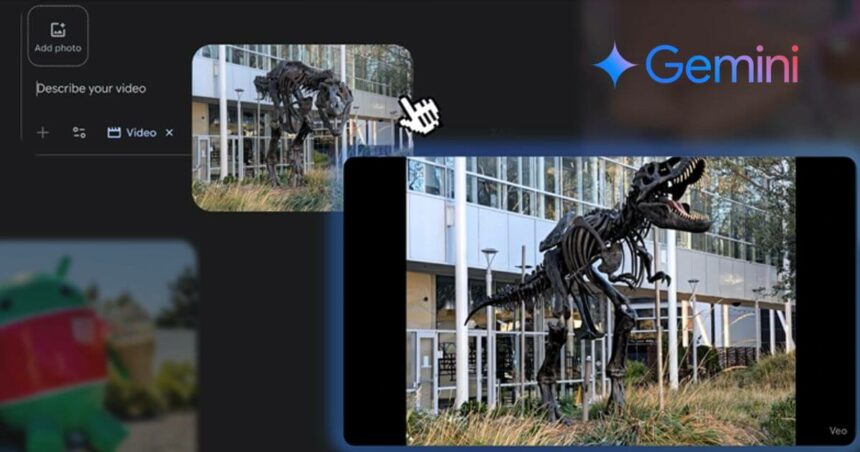
Simple Start: Use a basic prompt like: “The dinosaur skeleton comes to life.”

Your museum photo suddenly becomes a scene from a movie with the help of Gemini. The skeleton starts moving, creating an engaging story from a simple snapshot.

Advanced Technique: Take it up a notch and add detailed direction in your prompt to make your own vision shine through. To make it more dynamic, try adding characters and sequencing their actions.

Method 3: Articulate And Artistic Vision

Pitching creative ideas is an important part of daily work. Realistic rendering from Gemini can help visualise concepts for others, making pitches more effective.

Instead of explaining complex ideas with words alone, Gemini allows you to show exactly what you mean. This method helps colleagues understand your vision immediately.

In this case, the prompt needs to be clear and precise. While this may be more time-consuming, it’s faster than constructing from text only. Gemini is output-based on a real set and is also more helpful than using sample photos that may only partially convey the occasion.

Prompt:

“Open the scene with the image and hold for one second. Then, the wall color changes to a bright blue, and a wooden coffee table appears in front of the two armchairs in the image. On the coffee table appear two large podcasting microphones. The rest of the room is unchanged. Hold for one second. Then, the wall color changes to a light gray, and the microphones disappear from the coffee table. Next, on the table appears a black tablecloth, two plates of chicken wings, and several bottles of hot sauce. The rest of the room is unchanged. Hold for one second. Then, the wall color changes to a vibrant pink. The plates of chicken wings, bottles of hot sauce, and black tablecloth disappear from the coffee table. Then, on the table appears: a bright blue tablecloth and a birthday cake with lit candles. Birthday balloons appear and float in the background. The rest of the room is unchanged. Throughout the video, an instrumental track of an upbeat pop song.”

This photo-to-video feature opens up new possibilities for content creators everywhere. Whether you’re making social media content, presenting ideas to clients, or just having fun with photos, these three methods give you powerful tools to work with.

The key is to start simple and build your skills over time. Each method serves a different purpose, so choose one based on what you’re trying to achieve. Most importantly, don’t be afraid to experiment and see what works best for your specific needs in Gemini.

Follow Us: Facebook | X | Instagram | YouTube | Pinterest

Sign Up For Daily Newsletter

Be keep up! Get the latest breaking news delivered straight to your inbox.
[mc4wp_form]
By signing up, you agree to our Terms of Use and acknowledge the data practices in our Privacy Policy. You may unsubscribe at any time.
Share This Article
Facebook Whatsapp Whatsapp Reddit Email
What do you think?
Happy0
Love0
Sad0
Surprise0
Angry0
ByPrateesha Singh
Content Writer
Follow:
I’m a passionate writer and a graduate with a natural talent for storytelling. I find joy in both reading and writing. My commitment to social work enriches my literary journey. My journey is driven by a desire to make a difference through words and action.
Previous Article PhonePe IPO PhonePe IPO Filing: Walmart-Backed Fintech Giant Files Draft Prospectus With SEBI
Next Article Samsung AI Smart Home India Samsung AI Smart Home Launch In India: The Future Of Smart Living Is Here

Stay Connected

21.5KLike
331Follow
789Pin
160Follow
- Advertisement -

							banner							
							banner
Create an Amazing Newspaper
Discover thousands of options, easy to customize layouts, one-click to import demo and much more.
Learn More

Latest News

Flipkart Freedom Sale 2026
Flipkart Freedom Sale 2026 Announced: Sale Date, Early Access, Bank Offers And Discounts
Tech News
Google Selfie Video
Google Selfie Video Feature Explained: How To Enable It For Sign-In And Recovery
Tech News
WhatsApp Media Storage
A Guide To Stop WhatsApp From Saving Media To Your Phone
Apps
Samsung Z Fold 8 Vs Samsung Z Fold 8 Ultra Price Specs
Samsung Galaxy Z Fold 8 Ultra Vs Galaxy Z Fold 8: Price, Specifications And Key Differences Explained
Smartphones

Trending On Techotales

Gemini And Claude Narrow The Gap With ChatGPT
Artificial Intelligence

Gemini And Claude Narrow The Gap With ChatGPT, Says New AI Report

7 Min Read
OnePlus Nord 6 Price And Features
Tech NewsSmartphones

OnePlus May Leave India In 2027 Under Oppo Restructuring: Here’s What The Latest Report Says

8 Min Read
WhatsApp Username Feature Working
AppsTech News

WhatsApp Username Feature Explained: How You Can Chat Without Sharing Your Phone Number

11 Min Read
Google Finance App Android
AppsFinance

Google Announces Finance App For Android: AI Insights, Portfolio Tracking And Live Market Data

11 Min Read
Previous Next
TechotalesTechotales
Follow US
Copyright © Techotales | All Rights Reserved.
  • ABOUT US
  • DISCLAIMER
  • PRIVACY POLICY
  • CONTACT
  • TERMS OF USE
Popup Newsletter Image Techotales
Join Us!
Subscribe to our newsletter and never miss out the details on latest launches, tech news, gadgets etc...
[mc4wp_form]
We do not spam, you can unsubscribe at any time.