



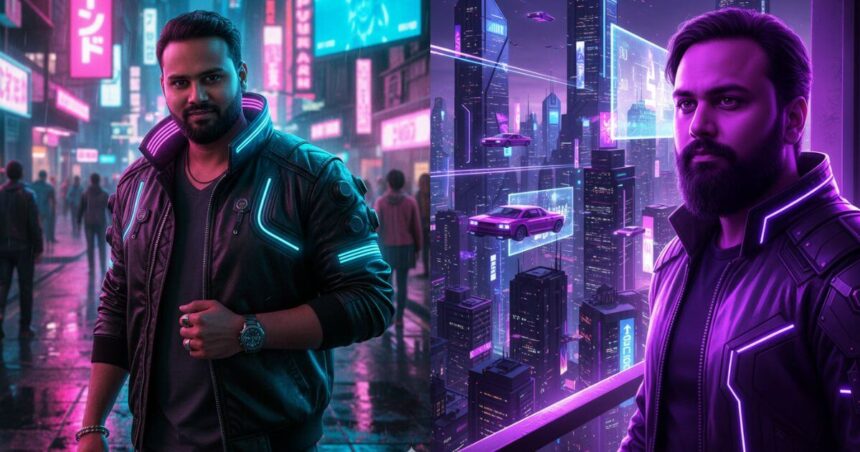
Google Gemini image making feature is currently trending across social media platforms. People everywhere are using this tool, writing prompts to transform ordinary photos into something stunning. The secret? Writing the right prompt or text description that tells the system exactly what you want.
What Is Google Gemini AI Photo Feature?
More Read

Google’s Gemini AI’s latest image feature is popular on social media. With this feature, you can create a variety of appealing portrait photos by simply giving unique prompts or a text description. You can alter clothing styles, add different backgrounds, and even create retro-style photos based on the prompt you provide.
The best part? You don’t need expensive software or years of editing experience. Just type the prompts what you want and watch your version come to life.
Copy-Pasting The Prompt May Not Give The Expected Result
Here is what most people get wrong. Many people use what is already available online, but this results in similar photos for everyone. When thousands of users copy the same instruction, their results look nearly identical.
Now, how to fix it? By writing your own custom prompts, you can create truly unique photos that nobody else has. Your image will stand out because it comes from your own creative vision.
The Simple Formula That Works For All
If you are having trouble writing your own prompt, we have a simple structure that will allow you to create your own prompts by just adding a few words.
How To Create Your Own Prompts For Google Gemini AI

The Magic Template
Convert the uploaded image of (person) into a (style) image. The person’s face should remain exactly as it appears in the original image. The pose and clothing should be merged to fit the new settings of (new settings). The image should feature (lighting and color element), and the overall mood should be (desired mood).
This template works every time. Just fill in the blanks with your chosen elements. To create a unique image, simply mix and match the examples below for each bracketed element in the general prompt.
Creating Your Own Google Gemini AI Image Prompts
Person: Who Is In The Photo?
Start by identifying your subject:
- The woman
- The man
- The couple
- The child
- The girl
- The boy
This tells the system what to focus on during the transformation.
Style: What Look Do You Want?
Choose your visual style:
- Retro style
- Cinema
- Hyper-realistic studio
- Vintage Bollywood-inspired
- Black and white portrait
- Anime style
- Cyberpunk
- Watercolour painting
- Street photography
Each style creates a completely different feel for your photo.
New Settings: Where They Should Be?
- A bustling 1950s city street with classic cars and a neon sign
- An elegant, dimly lit 1940s Jazz club, seated at a small table near the stage
- A futuristic 1980s-inspired cityscape with flying cars and glowing holographic billboards
- A sunlit living room from the 1970s with floral wallpaper and vintage furniture
- A rustic 1960s roadside diner, leaning against a vintage jukebox
- A teacher in a class, leaning against a wooden desk
- A relaxed camping chair by a quiet river bank
- A bustling, futuristic street market with vibrant, holographic advertisements
- A serene, snowy mountain landscape at dusk
- An underwater fantasy world with glowing coral and ethereal sea creatures
Lighting And Colors
- Warm, soft lighting, reminiscent of sepia-toned photography
- The dramatic glow of vintage neon signs, and moody shadows
- Bright, high-key lighting with best colour grading, typical of 1950s advertisements
- A green, slightly desaturated film look with soft, natural light
- Soft and moody lighting with deep shadows and subtle highlights
- Bold, neon-lit colours and sharp contrast
- Warm, golden-hour lighting with subtle lens flare
- Vibrant, saturated colours with dynamic light sources and reflections
- A dark, moody atmosphere with a simple, sharp spotlight
- Ethereal soft blue and green light filtering through water
Desired Mood: What Feeling Do You Want?
- Nostalgic and serene, evoking a sense of peaceful reflection
- Lively and vibrant, full of energy and classic charm
- Cozy and intimate, with a warm, inviting atmosphere
- Dreamlike and melancholic, with a hint of mystery
- Sophisticated and intimate
- Cyberpunk and energetic
- Classic and intellectual
- Calm and introspective
- Romantic and free-spirited
- Innocent and joyful
Conclusion
Google Gemini’s photo feature opens up endless creative possibilities when you know how to use it properly. This simple template system helps you create unique, eye-catching photos that reflect your personal style with your own custom prompts.
The key is being specific about what you want. Instead of using someone else’s generic prompt, craft your own dedicated, detailed description. Your photos will be one of a kind because they come from your unique vision.
Ready to get started? Pick one element from each category, plug them into the template, and watch your ordinary photo transform into something really extraordinary.
Follow Us: Facebook | X | Instagram | YouTube | Pinterest