By using this site, you agree to the Privacy Policy and Terms of Use.
Accept
TechotalesTechotalesTechotales
  • HOME
  • SMARTPHONES
  • BUSINESS
  • AI
  • AUTOMOBILE
  • TECHNOLOGY
  • TELECOM
  • WEARABLES
  • GADGET
  • TABLETS
  • FINANCE
  • APPS
  • TECH NEWS
  • GAMING
  • APPLIANCES
  • AUDIO
  • SOCIAL
  • LAPTOPS
  • CRYPTO
  • ABOUT US
  • DISCLAIMER
  • PRIVACY POLICY
  • CONTACT
  • TERMS OF USE
Copyright © Techotales | All Rights Reserved
Reading: Restore Old Photos In Color Using This Google Nano Banana Pro Prompt: Step-By-Step Guide
Notification Show More
TechotalesTechotales
  • HOME
  • SMARTPHONES
  • BUSINESS
  • AI
  • AUTOMOBILE
  • TECHNOLOGY
  • TELECOM
  • WEARABLES
  • GADGET
  • TABLETS
  • FINANCE
  • APPS
  • TECH NEWS
  • GAMING
  • APPLIANCES
  • AUDIO
  • SOCIAL
  • LAPTOPS
  • CRYPTO
Follow US
  • ABOUT US
  • DISCLAIMER
  • PRIVACY POLICY
  • CONTACT
  • TERMS OF USE
Copyright © Techotales | All Rights Reserved.
Techotales > Blog > Technology > Restore Old Photos In Color Using This Google Nano Banana Pro Prompt: Step-By-Step Guide
TechnologyArtificial Intelligence

Restore Old Photos In Color Using This Google Nano Banana Pro Prompt: Step-By-Step Guide

A simple guide to restoring and colourising old black-and-white family photos using Google Nano Banana Pro.

Prateesha Singh
Last updated: November 30, 2025 9:06 PM
Prateesha Singh - Content Writer
Share
Old Photos In Color Using This Google Nano Banana Pro Prompt
SHARE

Old family photos hold memories we never want to lose. But many of them are faded, damaged, or stuck in dull black and white. Now, thanks to Google Nano Banana Pro, you can turn those vintage pictures into colourful, modern-looking photographs within minutes. The process is simple, beginner-friendly, and surprisingly accurate. Here’s how you can restore and colourise your old photos using this powerful tool.

Contents
  • What Is Nano Banana Pro?
  • How To Colorize Your Old Photo?
    • Get Started With Gemini
    • Find The Image Tool
    • Upload And Use This Prompt
  • Want To Make Videos Too?
  • What Else Can Nano Banana Pro Do?
    • Makes Infographics
    • Powered By Gemini 3 Pro
    • Connected To Google Search
  • Who Should Use This?
  • Tips That Actually Help

What Is Nano Banana Pro?

Gemini Nano Banana Prompt
Gemini/Techotales

More Read

Pixel Sense Features
Google Introduces Its Latest AI Assistant Pixel Sense: Explore Top Features, And More
DeepSeek-R1: 5 Fascinating Use Cases That Prove It’s A Game-Changer In AI
OpenAI Launches ChatGPT Go: Affordable AI Plan For Indian Users At ₹399 Per Month
How To Turn Live Photos Into Videos On iPhone: A Step-by-Step Guide
Spotify Introduces New Premium Plans In India: Full Pricing And Feature Breakdown

Nano Banana Pro is Google’s tool that is getting quite popular. It does too many things: creates new images from your text description and edits existing photos while keeping the important details intact.

People have been using it for all sorts of things. Some make infographics, others create product designs, and many use it for social media content. But the coolest part? You can now restore your old family photos with it.

How To Colorize Your Old Photo?

Old Image Restoration Vivid Colourful ✨
Use Google Gemini AI
Prompt ⬇️

"Faithfully restore this image with high fidelity to modern photography quality, in full color, upscale to 4K"#NanoBananaPro #Prompt #Gemini #GeminiAI pic.twitter.com/5x2mhNDWsk

— Techotales (@techotales) November 30, 2025

Here is the actual process. It is pretty straightforward.

Get Started With Gemini

First, open the Gemini app or go to the Gemini website. Sign in with your Google account. A free account works fine for photo restoration, but you will need a paid one if you want to make videos later.

Find The Image Tool

Look for the menu and click on Generate Image. That’s where you will upload your old photo.

Upload And Use This Prompt

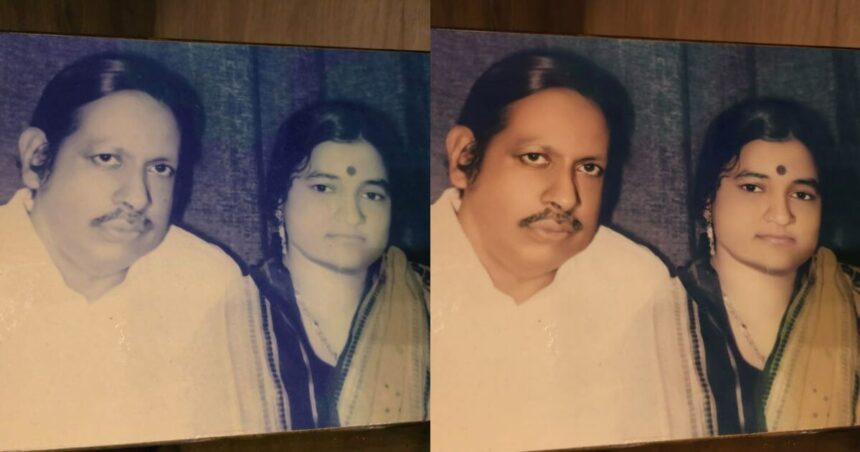
Upload your black and white or faded picture. Then type this prompt: “faithfully restore this image with high fidelity to modern photography quality, in full colour, upscale to 4K.”

That’s it. The tool processes your image and adds color to it. Usually, it takes less than a minute.

Want To Make Videos Too?

  • Once you have your colored photo, you can turn it into a short video. This shows how people from old photos might have looked if they were moving.
  • Go back to Gemini, tap Tools, then Create Videos. Upload your restored image. But here is the catch: the video feature only works for paid users.
  • Don’t want to pay? Try Grok’s Imagine feature instead. The quality won’t be as good as Gemini’s, but it is free and adds some fun effects to your photos.

What Else Can Nano Banana Pro Do?

Makes Infographics

You don’t need to give detailed instructions. Just ask it to create an infographic about something like a recipe or a topic you are interested in. It pulls information from Google search and designs it for you.

For example, ask for an infographic about making tea, and it will create one with all the steps and ingredients.

Powered By Gemini 3 Pro

Nano Banana Pro runs on Google’s Gemini 3 Pro model. This is what makes it smart enough to understand what you want and fetch information from the web when needed.

Connected To Google Search

This is what makes it different from other AI image tools. It can search the internet and use that information to create better, more accurate images.

Who Should Use This?

  • Families: restore old family photos and see your ancestors in colour. Make history feel more real.
  • History Buffs: colorize historical photos to make them more engaging and easier to connect with.
  • Social Media Users: create interesting content by restoring historical images and sharing the before-and-after results.
  • Genealogy Research: make your family tree presentations more appealing with coloured photos.

Tips That Actually Help

  • Scan your old photos at high quality before uploading them.
  • Keep the original photos safe, make copies.
  • Try different photos to see what works best.
  • Stick to the prompt given above; it works well.

The AI guesses what colors to use based on what it has learned from millions of photos. So the colour might not be one hundred percent accurate to real life. A blue shirt might have actually been green. But it usually gets things pretty close, especially with common items like grass, sky, and skin tones.

Video generation needs a paid account. If you don’t want to pay, use Grok as mentioned earlier.

Colorizing old photos no longer requires expensive software or expert editing skills. With Nano Banana Pro, anyone can restore memories in just a few clicks. Whether you want to revive family history, create social content, or simply experiment with AI tools, this feature makes the process incredibly easy. Give it a try — your old photos might surprise you once they come back to life in full color.

Follow Us: Facebook | X | Instagram | YouTube | Pinterest

Gemini 2.0: Google’s New AI Is Twice As Fast – Here’s What’s New
Best Prompts To Create 3D Caricatures With Different Expressions Using Google Gemini Nano Banana
OpenAI Launches Operator: The AI Agent That Can Book Tickets, Order Groceries And More, How It Works
Android 16 Release Date, Features, And Eligible Devices List Revealed
Gemini 2.0 Flash Thinking: The AI Model That Can ‘Think’ Like Never Before

Sign Up For Daily Newsletter

Be keep up! Get the latest breaking news delivered straight to your inbox.
[mc4wp_form]
By signing up, you agree to our Terms of Use and acknowledge the data practices in our Privacy Policy. You may unsubscribe at any time.
Share This Article
Facebook Whatsapp Whatsapp Reddit Email
What do you think?
Happy0
Love0
Sad0
Surprise0
Angry0
ByPrateesha Singh
Content Writer
Follow:
I’m a passionate writer and a graduate with a natural talent for storytelling. I find joy in both reading and writing. My commitment to social work enriches my literary journey. My journey is driven by a desire to make a difference through words and action.
Previous Article Change UPI PIn GPay Without Debit Card Using Aadhaar Google Pay Lets Users Reset UPI PIN Without A Debit Card Using Aadhaar: Step-By-Step Guide
Next Article Sim Binding Whatspp WhatsApp, Telegram Hit By New SIM Binding Rule In India: What It Is And How It Will Affect Users

Stay Connected

21.5KLike
331Follow
789Pin
160Follow
- Advertisement -
banner banner
Create an Amazing Newspaper
Discover thousands of options, easy to customize layouts, one-click to import demo and much more.
Learn More

Latest News

Spam Calls
Frustrated By Unknown Calls? Here’s How To Reduce Spam Calls With Simple Phone Habits
Telecom Tech News
India 190 IPOs
India Set For Over 190 IPOs In 2026 As Reliance Jio And Zepto Line Up
Finance Business
Oppo Pad 5 Price Specs
Oppo Pad 5 Launched In India With 12.1-inch Display: Price, Battery, And Full Specifications
Tablets
ChatGPT Traffic Drops
ChatGPT Traffic Drops 22% After Google Launches Gemini 3
Tech News Artificial Intelligence
TechotalesTechotales
Follow US
Copyright © Techotales | All Rights Reserved.
  • ABOUT US
  • DISCLAIMER
  • PRIVACY POLICY
  • CONTACT
  • TERMS OF USE
Popup Newsletter Image Techotales
Join Us!
Subscribe to our newsletter and never miss out the details on latest launches, tech news, gadgets etc...
[mc4wp_form]
We do not spam, you can unsubscribe at any time.