By using this site, you agree to the Privacy Policy and Terms of Use.
Accept
TechotalesTechotalesTechotales
  • HOME
  • SMARTPHONES
  • BUSINESS
  • AI
  • AUTOMOBILE
  • TECHNOLOGY
  • TELECOM
  • WEARABLES
  • GADGET
  • TABLETS
  • FINANCE
  • APPS
  • TECH NEWS
  • GAMING
  • APPLIANCES
  • AUDIO
  • SOCIAL
  • LAPTOPS
  • CRYPTO
  • ABOUT US
  • DISCLAIMER
  • PRIVACY POLICY
  • CONTACT
  • TERMS OF USE
Copyright © Techotales | All Rights Reserved
Reading: WhatsApp Now Lets You Add Music To Status Updates: Step-by-Step Guide
Notification Show More
TechotalesTechotales
  • HOME
  • SMARTPHONES
  • BUSINESS
  • AI
  • AUTOMOBILE
  • TECHNOLOGY
  • TELECOM
  • WEARABLES
  • GADGET
  • TABLETS
  • FINANCE
  • APPS
  • TECH NEWS
  • GAMING
  • APPLIANCES
  • AUDIO
  • SOCIAL
  • LAPTOPS
  • CRYPTO
Follow US
  • ABOUT US
  • DISCLAIMER
  • PRIVACY POLICY
  • CONTACT
  • TERMS OF USE
Copyright © Techotales | All Rights Reserved.
Techotales > Blog > Apps > WhatsApp Now Lets You Add Music To Status Updates: Step-by-Step Guide
AppsTech News

WhatsApp Now Lets You Add Music To Status Updates: Step-by-Step Guide

Learn how to add music to your WhatsApp status and make your updates more engaging with this new feature.

Prateesha Singh
Last updated: June 16, 2025 4:27 PM
Prateesha Singh - Content Writer
Share
Add Music WhatsApp Status
SHARE

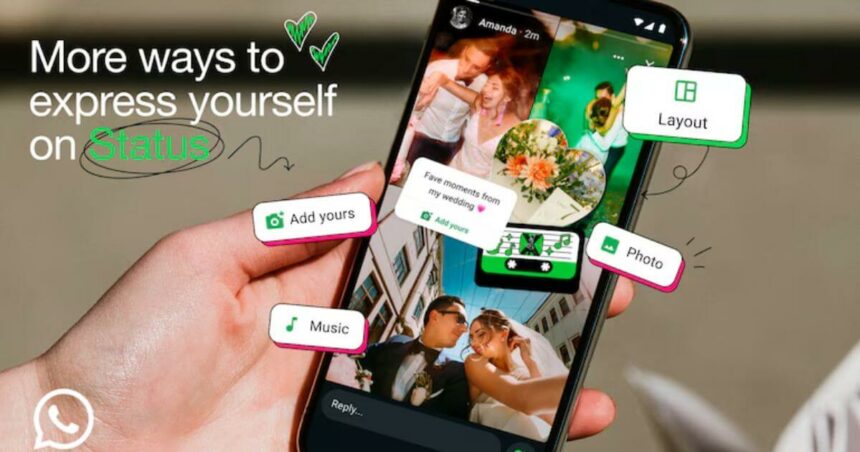
WhatsApp has finally caught up with social media trends. The popular messaging app now lets you add music to your status updates, just like Instagram and Facebook stories. This exciting new feature makes your status posts more fun and engaging than ever before.

Contents
  • What’s New In WhatsApp Status?
  • Duration Of Music On Your WhatsApp Status?
  • Step-by-Step Guide To Add Music On WhatsApp Status
  • Why Do These Features Matter?

What’s New In WhatsApp Status?

WhatsApp Deleted Messages
Pexels

Remember how your WhatsApp status used to look compared to Instagram stories? Those days are over. WhatsApp’s latest update brings music integration directly to your status updates. You can now add background music to both photos and videos, making your content more lively and entertaining.

The best part? Your music enhances status updates while maintaining WhatsApp’s signature end-to-end encryption, keeping your creative content secure and private.

Duration Of Music On Your WhatsApp Status?

WhatsApp has set a specific time limit for music in status updates.

  • For images: You can add up to 15 seconds of music
  • For videos: You can include up to 60 seconds of background music

These durations give you plenty of time to capture the perfect moment of your favorite song.

Step-by-Step Guide To Add Music On WhatsApp Status

WhatsApp
WhatsApp

Adding music to your WhatsApp status is surprisingly simple. Here is exactly how you do it. First, make sure your ‎WhatsApp is updated. Check your App Store for the latest version before starting.

  • Open WhatsApp and look for the updates tab at the bottom of your screen.
  • Tap to add a status to create a new status update.
  • Choose your content, select any image or video from your phone gallery.
  • Find the music icon at the bottom of your screen and tap it.
  • Browse your music, and you will see a list of songs saved on your device.
  • Pick your perfect moment, using the slider tool to select which part of the song you want.
  • Tap done when you are satisfied with your selection.
  • Review your settings, check who can see your status and ads if needed. (Considered to be “add”)
  • Hit the green button to share your music masterpiece.

Before you start creating your music status updates, keep these pointers in mind:

More Read

WhatsApp Latest Update Features
WhatsApp Latest Update Introduces Missed Call Messages, AI Images, And Smarter Video Calls
9 Unique Android Features You Won’t Find On iPhones
Sarvam Edge: Indian Startup Launches Offline AI Model For Smartphones
Netflix Adds ‘Clips’ Feed With Vertical Videos In Major App Redesign
Apple’s WWDC 2025 Full Preview: iOS 26, AI Features, macOS ‘Tahoe’ And More Announced
  • Currently, you can only use songs that are already saved on your phone. WhatsApp doesn’t provide an online music library like Spotify or Apple Music integration yet.
  • This feature is still being released worldwide. If you don’t see the music option yet, don’t worry, it’s coming to your device soon.
  • Your music status updates follow the same privacy rules as regular status posts. Make sure you have set your audience preferences correctly.
  • Just like regular status updates, your enhanced music post will disappear after 24 hours.

Why Do These Features Matter?

This update represents WhatsApp’s effort to compete with other social platforms while maintaining its focus on private communications. By adding music capabilities, WhatsApp makes it easier for users to express themselves creatively without leaving the app.

The feature is particularly appealing because it combines the familiar comfort of WhatsApp with creative tools people love on Instagram and TikTok.

Adding music to WhatsApp status is a game-changer for creative expression on the platform. Whether you are sharing vacation photos with upbeat tunes or adding emotional depth to special moments, this feature opens up new possibilities for storytelling.

Start experimenting with your favorite songs today, and watch how music transforms your WhatsApp status—from simple updates to engaging, memorable content that your contacts will want to watch.

Follow Us: Facebook | X | Instagram | YouTube | Pinterest

Google Gemini AI Daily Limits Of Prompts Revealed: Free, Pro, And Ultra Plans Explained
Flipkart Black Friday Sale 2025: Best Offers On Smartphones, Laptops, And Home Essentials
WhatsApp’s Latest Features: Selfie Stickers, Camera Effects, And More – Transform How You Chat, Share, And Express Yourself!
Meta Launches Instagram Plus In India At Rs 299 Per Month With Exclusive Features
Flipkart Black Vs Amazon Prime: A Detailed Comparison Of Price, Benefits, And Entertainment

Sign Up For Daily Newsletter

Be keep up! Get the latest breaking news delivered straight to your inbox.
[mc4wp_form]
By signing up, you agree to our Terms of Use and acknowledge the data practices in our Privacy Policy. You may unsubscribe at any time.
Share This Article
Facebook Whatsapp Whatsapp Reddit Email
What do you think?
Happy0
Love0
Sad0
Surprise0
Angry0
ByPrateesha Singh
Content Writer
Follow:
I’m a passionate writer and a graduate with a natural talent for storytelling. I find joy in both reading and writing. My commitment to social work enriches my literary journey. My journey is driven by a desire to make a difference through words and action.
Previous Article Sony Music Day Audio Discounts World Music Day Offer: Sony Announces Massive Discounts On Audio Products
Next Article Mobile Plans Switch Mobile Plans Every 30 Days: New Rule For Jio, Airtel, Vi, And BSNL Users

Stay Connected

21.5KLike
331Follow
789Pin
160Follow
- Advertisement -

							banner							
							banner
Create an Amazing Newspaper
Discover thousands of options, easy to customize layouts, one-click to import demo and much more.
Learn More

Latest News

CMF Watch 3 Pro Vs Noise ALT Watch 1 Techotales
Nothing CMF Watch 3 Pro Vs Noise ALT Watch 1: Complete Smartwatch Comparison Before You Buy
Wearables
OnePlus N6 Price Specifications
OnePlus N6 Launched In India With 8,000mAh Battery, Dimensity 6360 Apex Chipset: Price And Specifications
Smartphones
WhatsApp Username Feature Working
WhatsApp Username Feature Explained: How You Can Chat Without Sharing Your Phone Number
Apps Tech News
Moto Pad 70 Pro Price Specs
Moto Pad 70 Pro Launched In India With 13-Inch 3.5K Display, Snapdragon 8s Gen 4 And AI Features
Tablets
TechotalesTechotales
Follow US
Copyright © Techotales | All Rights Reserved.
  • ABOUT US
  • DISCLAIMER
  • PRIVACY POLICY
  • CONTACT
  • TERMS OF USE
Popup Newsletter Image Techotales
Join Us!
Subscribe to our newsletter and never miss out the details on latest launches, tech news, gadgets etc...
[mc4wp_form]
We do not spam, you can unsubscribe at any time.