By using this site, you agree to the Privacy Policy and Terms of Use.
Accept
TechotalesTechotalesTechotales
  • HOME
  • SMARTPHONES
  • BUSINESS
  • AI
  • AUTOMOBILE
  • TECHNOLOGY
  • TELECOM
  • WEARABLES
  • GADGET
  • TABLETS
  • FINANCE
  • APPS
  • TECH NEWS
  • GAMING
  • APPLIANCES
  • AUDIO
  • SOCIAL
  • LAPTOPS
  • CRYPTO
  • ABOUT US
  • DISCLAIMER
  • PRIVACY POLICY
  • CONTACT
  • TERMS OF USE
Copyright © Techotales | All Rights Reserved
Reading: How To Turn Live Photos Into Videos On iPhone: A Step-by-Step Guide
Notification Show More
TechotalesTechotales
  • HOME
  • SMARTPHONES
  • BUSINESS
  • AI
  • AUTOMOBILE
  • TECHNOLOGY
  • TELECOM
  • WEARABLES
  • GADGET
  • TABLETS
  • FINANCE
  • APPS
  • TECH NEWS
  • GAMING
  • APPLIANCES
  • AUDIO
  • SOCIAL
  • LAPTOPS
  • CRYPTO
Follow US
  • ABOUT US
  • DISCLAIMER
  • PRIVACY POLICY
  • CONTACT
  • TERMS OF USE
Copyright © Techotales | All Rights Reserved.
Techotales > Blog > Technology > How To Turn Live Photos Into Videos On iPhone: A Step-by-Step Guide
Technology

How To Turn Live Photos Into Videos On iPhone: A Step-by-Step Guide

Transform your Memories: Turn Live Photos into Videos on iPhone with Ease!

Praneet Samaiya
Last updated: November 18, 2024 11:00 PM
Praneet Samaiya - Founder
Share
Live Photos Into Videos iPhone
SHARE

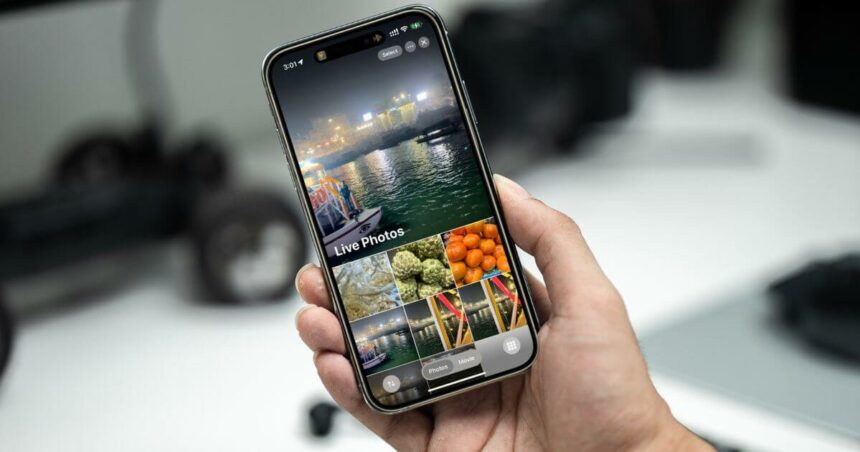
Today it’s a smartphone and digital photography for any age. However, would you settle for static images when the same moment is live? Turn these still frames into heartwarming video clips of reality, with a real feel of life with your iPhone’s new Live Photo feature. iPhone has brought a new Live Photo feature.

Contents
  • iPhone New Live Photo Feature
  • Steps To Convert Your Photo Into Live Photo
  • Conclusion

iPhone New Live Photo Feature

iPhone 16 iOS18
X/Techotales

Perhaps you’ll have important news to share with friends and family if you have Live Photos. Unlock a few seconds of movement and sound in a Live Photo to turn those into shareable video clips that tell a more dynamic story. It might be a candid moment with loved ones, or it could be a stunning landscape – turning these Live Photos into videos lets you relive the energy and emotion of the original scene.

Steps To Convert Your Photo Into Live Photo

1. Open Photos: Open the Photos app on your iPhone.
2. Tap Select the Live Photo: Scroll through your photos and locate the Live Photo you wish to transfer into a video.
3. Menu Sharing: Tap on the “Share” icon at the bottom left-hand corner.
4. Save as Video: In the sharing options, select “Save as Video”.

Just say it, and your live photo can be converted and captured into an actual video file in the next few taps. Share everywhere on all social apps you like: You can send the converted video file through your favorite social apps or messaging apps.

More Read

WhatsApp Call Scheduling Features
How To Silence Unknown Callers On WhatsApp And Stop Spam Calls
How To Convert Multiple Live Photos Into A Video On iPhone: A Step-By-Step Guide
How To Boost Wi-Fi Speed At Home: Common Mistakes You Must Avoid
10 Best Google Gemini Prompts To Create Realistic Garba And Dandiya Images For Navratri 2025
Zoho Vani Launch: India’s AI-Powered Visual Collaboration Platform

Aside from video creation speed, this feature also provides new possibilities in terms of creativity. You can try some sorts of editing techniques, like trimming the video or applying filters, to produce a product that looks visually great. This allows iPhone users to become savvy storytellers by transforming Live Photos into videos and just intermixing still and moving images to capture moments for life.

Conclusion

So the next time you feel glued to a moment of how long something has lasted, don’t compromise on that static shot but open up the magic of your iPhone’s Live Photo wherein such memories come alive as video clips for you to share out into the world. With this, you will be able to bring motion into stories in new ways.

Follow Us: Facebook | X | Instagram | YouTube | Pinterest

Nike Introduces Project Amplify: Future-Ready Walking Shoes With Built-In Motors And Smart Support
Gemini Nano Banana AI: 5 Google-Approved Prompts To Transform Your Pictures After Saree And Retro Trends
Downgrade From iOS 26 Beta To iOS 18 Without Losing Data: Complete Guide
Goodbye Skype: The 8 Best Alternatives For Video Calls And Messaging In 2025
Gemini AI: Here’s How To Upload Files On This AI-Powered App

Sign Up For Daily Newsletter

Be keep up! Get the latest breaking news delivered straight to your inbox.
[mc4wp_form]
By signing up, you agree to our Terms of Use and acknowledge the data practices in our Privacy Policy. You may unsubscribe at any time.
Share This Article
Facebook Whatsapp Whatsapp Reddit Email
What do you think?
Happy0
Love0
Sad0
Surprise0
Angry0
ByPraneet Samaiya
Founder
Follow:
Committed to making the web a better place for everyone.
Previous Article Android Features That iPhone Lacks 9 Unique Android Features You Won’t Find On iPhones
Next Article OpenAI ChatGPT Founder OpenAI Buys Chat.com Domain For $15 Million, Redirects To ChatGPT

Stay Connected

21.5KLike
331Follow
789Pin
160Follow
- Advertisement -
banner banner
Create an Amazing Newspaper
Discover thousands of options, easy to customize layouts, one-click to import demo and much more.
Learn More

Latest News

OnePlus Pad 4 Price Specs
OnePlus Pad 4 With Snapdragon 8 Elite Gen 5 Launched In India: Full Specs And Price
Tablets
Lenovo Idea Tab Pro Gen 2 Specs
Lenovo Idea Tab Pro Gen 2 With 3.5K Display And 10,200mAh Battery Launched: Price And Specifications
Tablets
Instagram Instants App
Instagram Tests Instants App With Disappearing Photos To Rival Snapchat
Social Apps
Sennheiser CX 80U And HD 400U
Sennheiser CX 80U And HD 400U Launched In India With USB Type C Audio
Audio Gadget
TechotalesTechotales
Follow US
Copyright © Techotales | All Rights Reserved.
  • ABOUT US
  • DISCLAIMER
  • PRIVACY POLICY
  • CONTACT
  • TERMS OF USE
Popup Newsletter Image Techotales
Join Us!
Subscribe to our newsletter and never miss out the details on latest launches, tech news, gadgets etc...
[mc4wp_form]
We do not spam, you can unsubscribe at any time.