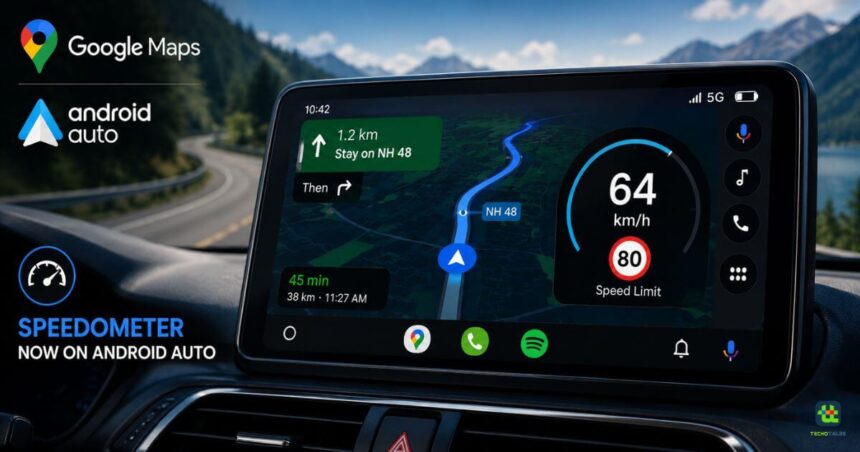
Google has finally started rolling out one of the most requested features for Android Auto users. The latest update brings a built-in speedometer to Google Maps on Android Auto, allowing drivers to view their vehicle’s real-time speed directly on the infotainment display while navigating. Alongside the live speed reading, Google Maps can also show the posted speed limit on supported roads, making it easier for drivers to stay informed without taking their eyes off the navigation screen.
The feature has been available on the mobile version of Google Maps in several regions for years. However, Android Auto users had been waiting for Google to bring the same functionality to the in-car experience. With the rollout now underway, Google is finally bridging that gap and making navigation more practical for millions of drivers.
Google Maps Now Shows Live Speed On Android Auto
The new speedometer is integrated directly into the Google Maps navigation interface on Android Auto. While following a route, users can now see their vehicle’s current speed displayed on the infotainment screen instead of relying solely on the car’s instrument cluster.



On roads where Google has speed limit data available, Maps also displays the applicable speed limit next to the live speed reading. This provides drivers with quick access to important driving information in a single place, helping them remain aware of both their current speed and the legal speed limit.
Although the feature is designed to improve driving awareness, Google reminds users to always follow their vehicle’s speedometer as the primary reference, since GPS-based speed readings may occasionally vary slightly.
A Long-Awaited Feature Finally Arrives
Android Auto users have been requesting a built-in speedometer for years. While Google Maps on smartphones already supported the feature in many countries, its absence from Android Auto remained one of the most common complaints among users.
The latest update finally brings feature parity between the mobile and in-car versions of Google Maps. It also reduces the need to constantly shift attention between the vehicle’s instrument cluster and the infotainment display, offering a more seamless navigation experience.
The addition reflects Google’s continued focus on refining Android Auto with features that improve convenience without adding unnecessary complexity.
Rolling Out Gradually To Users
Google is introducing the speedometer through a server-side rollout, which means the feature will not appear for everyone at the same time.
Even users running the latest versions of Android Auto and Google Maps may have to wait until Google enables the feature for their account. As with many Google software updates, availability will expand gradually across different regions and supported vehicles.
The company has not shared an official timeline for when the rollout will be completed globally.
More Improvements Coming To Android Auto
The speedometer joins a growing list of enhancements that Google has introduced to Android Auto over the past several months.
The platform has received improvements to navigation, smarter Google Assistant integration, refreshed user interface elements, better support for larger infotainment displays, and new AI-powered capabilities designed to make driving safer and more convenient.
Google continues investing heavily in Android Auto as connected vehicles become increasingly common. Future updates are expected to bring additional navigation tools, productivity features, and deeper integration with Google’s expanding ecosystem of services.
Why The Speedometer Matters
While the feature may appear small, it solves a practical problem for many drivers. Having both navigation and speed information visible on the same screen helps reduce distractions and improves situational awareness during long journeys.
Combined with speed limit information, the new addition can also help drivers avoid unintentionally exceeding legal limits, especially in unfamiliar areas. For users who frequently depend on Google Maps for navigation, the update makes Android Auto a more complete in-car navigation solution.
Conclusion
Google’s decision to finally bring the speedometer to Google Maps on Android Auto is a welcome upgrade for drivers who have been requesting the feature for years. The ability to view live speed alongside posted speed limits makes navigation more informative and reduces the need to glance away from the infotainment display.
Since the rollout is happening in phases, not every Android Auto user will receive the feature immediately. However, those using the latest versions of Google Maps and Android Auto should see it appear over the coming weeks as Google expands availability. With this addition, Android Auto continues to evolve into a smarter, safer, and more capable platform for everyday driving.
Follow Us: Facebook | X | Instagram | YouTube | Pinterest