

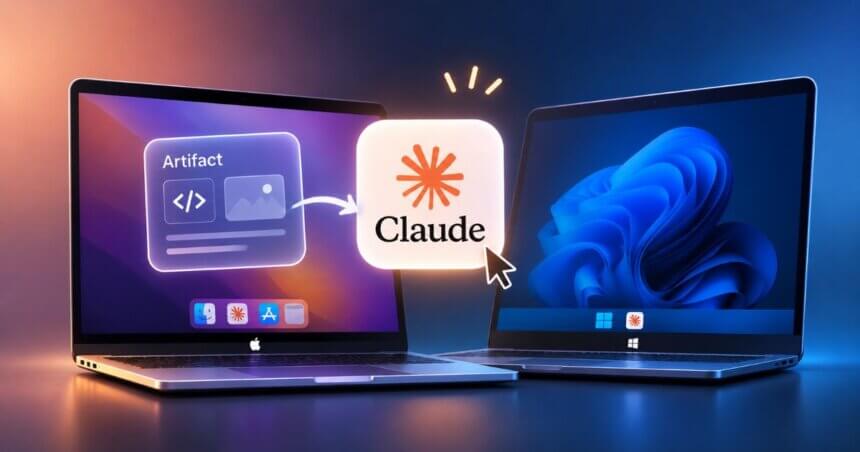
Anthropic has introduced a new feature that allows users to install Claude-generated Artifacts as desktop applications on Mac and Windows computers. The new Install as app feature is rolling out in beta, allowing users to turn interactive tools created through Claude into standalone desktop apps with their own icons and windows.
Until now, Claude Artifacts could be created, edited and shared within the AI assistant’s interface. With this update, users can take those creations beyond the chat window and access them like regular desktop applications. The feature also allows installed apps to use Claude and connected services, while requesting permission to interact with certain operating system features.
Claude Artifacts Can Now Work Like Desktop Apps
You can now install Claude artifacts as desktop apps on Mac and Windows.
Ask Claude to build an artifact, click "Install as app", and open it like any other app. It can use your connectors and, if you allow it, send notifications or add a menu bar item. pic.twitter.com/8CBgqe5OKq
— ClaudeDevs (@ClaudeDevs) November 24, 2026Artifacts are interactive outputs that Claude generates based on user instructions. These can include dashboards, visualisations, websites and custom productivity tools. Users can describe what they want to build, and Claude creates the corresponding Artifact.
More From Techotales



Anthropic is now making it possible to install eligible Artifacts directly on a computer. Once installed, an Artifact gets its own application icon and opens in a separate window rather than remaining inside Claude Desktop.
The apps can also use Claude and the user’s connected services, known as connectors. For example, someone could create a meeting preparation tool that uses calendar and email information or build an order tracker to monitor daily deliveries.
Another useful addition is automatic updates. Installed applications remain connected to their original Artifacts, meaning changes made by the owner or another editor are reflected in the installed app. Users can also share these applications with others.
Anthropic has shared several examples of tools created internally, including Linnet, a layered image editor; Phosphor, a file manager; Sift, an AI-assisted file organisation tool; Tern, a terminal with Claude integration; and Vitals, a utility for checking computer performance from the menu bar or system tray.
How To Install Claude Artifacts As Desktop Apps
Installing an Artifact does not require users to package or sign an application manually. They also do not need a separate API key or an additional login because the installed app uses their existing Claude account. Here is how users can install an eligible Artifact:
- Open Claude Desktop on a Mac or Windows computer.
- Create an Artifact by describing the application or tool they want.
- Open the Artifact in the main Claude Desktop window.
- Select the Artifact’s title menu or right-click on it.
- Choose the Install as app option.
- Select Install to confirm.
Users can also find the installation option under the Share menu. Once installed, Mac users can access their applications from the Claude Apps folder inside their home Applications folder, macOS Spotlight or the Apps launcher. Windows users can open them through the Start menu’s Claude Apps folder or a desktop shortcut.
The feature requires Claude for Mac or Claude for Windows version 6.28899.0 or later. Users who cannot find the installation option should check whether their desktop application needs an update.
Installed Apps Can Access Notifications, Menu Bars And System Features
One of the more interesting aspects of this update is that installed Claude Artifacts are not limited to displaying content in a separate window. With user permission, they can interact with certain operating system features.
For example, an application can request permission to send desktop notifications, respond to keyboard shortcuts while users are working in other applications, or stay visible above other windows. It can also add an item to the macOS menu bar or Windows system tray. Anthropic has introduced three levels of permissions for installed applications:
- Default: Apps have access to capabilities available through a browser.
- App permissions: Apps can request access to selected desktop features, including notifications, keyboard shortcuts, floating windows and menu bar or system tray items.
- Full computer access: Apps can request permission to run programs and read, modify or delete files without asking for approval each time.
However, users should be careful before granting the highest permission level. Anthropic clearly warns that it does not review applications before installation. Full computer access should only be granted to applications whose creators the user trusts.
There is another important safeguard. Permission granted to an application applies only to its current version. If the application is updated, Claude asks for permission again, even when the changes are made by the original creator. However, code loaded from an external website may change without triggering another permission request.
Claude Artifacts Desktop Apps: Availability And Limitations
The Install as app feature is rolling out in beta across Claude’s Free, Pro, Max, Ultra, Team and Enterprise plans. However, availability also depends on organisational settings. On Team plans, installation is enabled by default, while full computer access remains disabled until an administrator enables it. On Enterprise plans, the entire feature is switched off by default and must be enabled by an organisation owner.
There are also a few limitations users should know about. Installed Artifact apps are currently available only on Mac and Windows, with Linux, web and mobile platforms excluded. Template-based Artifacts such as Claude Docs, Slides and Sheets cannot be installed. Legacy Artifacts and live Artifacts from Claude Cowork are also excluded.
Another important point is that installed applications require an internet connection and an active sign-in to Claude Desktop. They are not completely independent applications that can continue working without Claude. Additionally, building an app and any requests it makes to Claude count towards the user’s existing plan usage limits.
With this update, Anthropic is making Claude more useful beyond traditional AI conversations. Users can now describe a tool, build it through Claude and install it directly on their computers without going through the usual software packaging process. While the beta still has limitations and permission-related considerations, it offers an interesting glimpse into how AI assistants could change the way people create and use desktop software.
Follow Us: Facebook | X | Instagram | YouTube | Pinterest