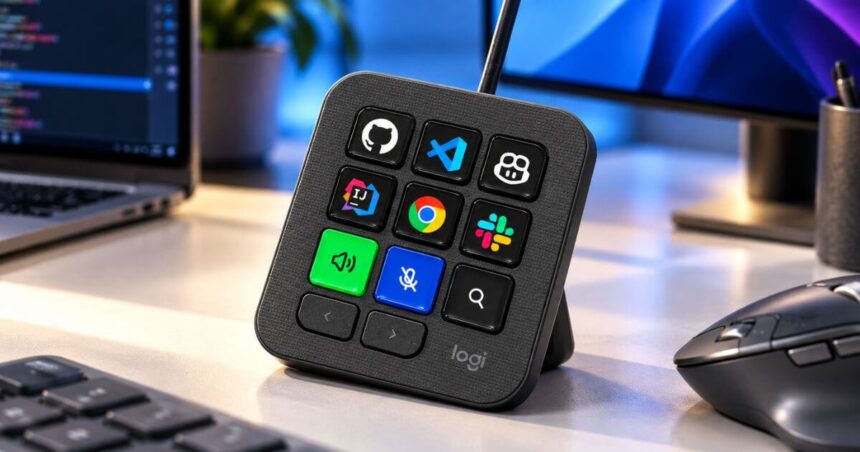
Logitech has launched the MX Keypad in India, bringing a different approach to AI-powered workflows. It is not a conventional keyboard. Instead, it is a compact control centre designed to give developers quick access to AI agents, coding tools and frequently used commands.
The new keypad comes with nine customisable LCD keys and two navigation buttons. The keys can change depending on the active application, giving users access to different controls without having to remember multiple keyboard shortcuts. Logitech says the MX Keypad was designed specifically for multi-app and multi-agent workflows.
Priced at Rs. 15,999, the MX Keypad is now listed on Logitech’s India website in Graphite. The company is also offering three months of GitHub Copilot Pro+ with the device.



Logitech MX Keypad Features
📢 Logitech MX Keypad launched in India!
🔲 9 customisable LCD keys
🤖 GitHub Copilot, Claude Code & Codex
💻 VS Code & IntelliJ support
🔄 App-aware controls
🛠️ Custom AI workflows
🎁 3 months GitHub Copilot Pro+
💰 ₹15,999#Logitech #MXKeypad #AI @Logitech pic.twitter.com/YS8f3BCCOh
— Techotales (@techotales) September 28, 2026The biggest highlight of the Logitech MX Keypad is its nine LCD keys. Users can configure these keys through the Logi Options+ app and assign them to specific commands, applications, AI agents or workflows.
The keypad can be used with tools such as GitHub Copilot, Claude Code, OpenAI Codex, Visual Studio Code and IntelliJ IDEA. Logitech says developers can use the physical keys to execute prompt macros, refactor code, launch commands and control different parts of their development workflow.
The keys are also app-aware. When users switch between supported applications, the controls can change automatically. This means the same physical keypad can offer different shortcuts when working in VS Code, Slack, Figma or other supported applications.
There are two navigation buttons below the LCD keys. Logitech has also designed the MX Keypad to work beyond coding. Supported applications include Zoom, Spotify, Microsoft Teams, PowerPoint, Excel, Notion, Slack, Figma, Adobe Lightroom, Photoshop, Premiere Pro, After Effects, Illustrator, Final Cut Pro, DaVinci Resolve and OBS Studio.
Built For AI And Developer Workflows
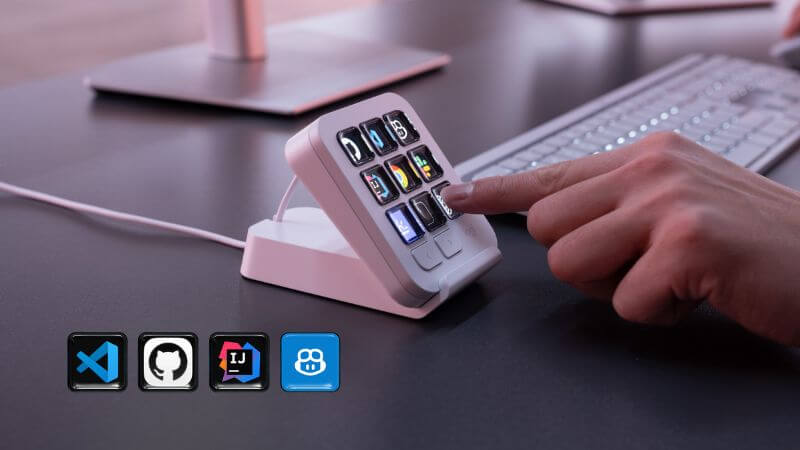
The MX Keypad is particularly focused on users who regularly switch between different AI tools. Logitech’s official integrations cover GitHub Copilot, Claude Code, VS Code and IntelliJ IDEA, while the company’s Logi Actions SDK allows developers to create custom integrations.
Plugins for Claude Code and OpenAI Codex are already available through the Logi Marketplace. These can provide functions such as AI agent status tracking and command-line controls directly through the physical keys. The keypad also supports voice commands and AI-powered workflows, although AI features require an active internet connection and an account with the respective third-party AI provider.
Logitech MX Keypad Specifications
The Logitech MX Keypad works with computers running Windows 10 or newer and macOS 13 or newer. It connects through USB-C, with the package also including a stand and USB-C cable.
The keypad measures 91.7 x 77.9 x 25.5mm and weighs approximately 96 grams. The included stand measures 112.7 x 58.5 x 20.5mm and weighs around 61 grams.
| Specification | Logitech MX Keypad |
|---|---|
| Key Type | 9 Customisable LCD Keys |
| Navigation | 2 Navigation Buttons |
| Software | Logi Options+ |
| AI Tools | GitHub Copilot, Claude Code, OpenAI Codex |
| Coding Tools | VS Code, IntelliJ IDEA |
| Compatibility | Windows 10+, macOS 13+ |
| Dimensions | 91.7 x 77.9 x 25.5mm |
| Weight | 96g |
| Stand Dimensions | 112.7 x 58.5 x 20.5mm |
| Stand Weight | 61g |
| Colour | Graphite |
| Warranty | 1-Year Limited Hardware Warranty |
| Bonus | 3 Months GitHub Copilot Pro+ |
Logitech MX Keypad Price In India
The Logitech MX Keypad price in India is Rs. 15,999. It is offered in a Graphite colour option and is listed through Logitech’s India online store. The exact sale date was not announced in the launch information.
Every unit comes with a one-year limited hardware warranty. Logitech is also bundling three months of GitHub Copilot Pro+, which can be redeemed through Logi Options+. The offer is available to both new and existing users, according to Logitech.
The keypad also uses certified post-consumer recycled plastic. Logitech says the Graphite version contains 64 percent recycled plastic, while its packaging uses paper sourced from FSC-certified forests and other controlled sources.
Conclusion
The Logitech MX Keypad is designed for a very specific kind of user. It is aimed at developers, creators and power users who constantly switch between AI assistants, coding environments and productivity applications.
Its nine LCD keys are the main attraction. They can adapt to the active application and give users quick access to frequently used commands. The ability to create custom integrations also makes the keypad more flexible than a simple shortcut pad.
At Rs. 15,999, Logitech is positioning the MX Keypad as a premium productivity accessory. For users with AI-heavy workflows, its physical controls could offer a more convenient way to manage multiple tools from one place.
Follow Us: Facebook | X | Instagram | YouTube | Pinterest