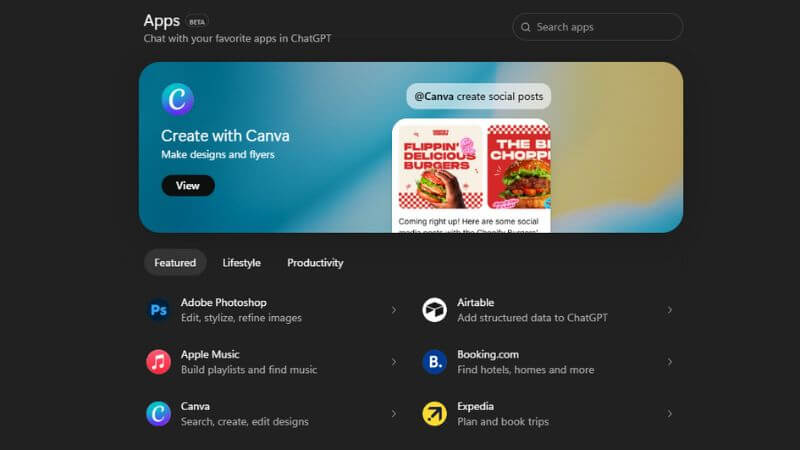
OpenAI has just pushed one of the biggest updates to ChatGPT so far. The company has officially rolled out its App Directory, and this changes how people will use ChatGPT daily. Instead of jumping between apps, tools, and tabs, you can now get real work done directly inside a chat. Designing, shopping, researching, or creating presentations now happens in one place, without breaking your flow.
ChatGPT App Directory
More Read

Think of it like the Apple Store or Google Play, but instead of downloading stuff to your phone, you are connecting apps to ChatGPT. Once connected, these apps are available directly in your chat.
OpenAI says these apps help you do real things like order groceries, turn an outline into a slide deck, or search for an apartment. The idea is simple: stop bouncing between ten different apps and just get things done in one place.
How Do You Actually Use It?
- Getting into the directory:
- Go to ChatGPT/apps on your browser.
- Or hit the Apps button on the left side if you are using the Android, iOS, or Windows app.
- Connecting an app:
- Find the app you want.
- Click Connect.
- Permit it to work with ChatGPT.
Using it in your chats:
- Just type @ and the app’s name.
- Example: @canva create a 2025 presentation for my class.
Most apps show you an example prompt with screenshots, so you are not guessing how to use them.
The Smart Stuff Behind It
Here is where it gets interesting. OpenAI is testing ways to automatically suggest apps based on what you’re talking about. The system looks at your conversation, remembers which apps you use often, and learns your preferences. So if you are chatting about making a presentation, it might nudge you towards Canva or similar tools without you having to ask.
Right now, the directory has three main sections:
- Featured: The apps OpenAI thinks you should check out.
- Lifestyle: Everyday stuff like shopping and travel.
- Productivity: Work tools and creative apps.
What Changes With Connections?
If you have been using ChatGPT for a while, you might remember connectors. OpenAI has just renamed them to make things clearer:
- Chat connectors are now Apps with File Search.
- Deep research connectors are now Apps with Deep Research.
- Synced connectors are now Apps with Sync.
Everything works the same. They have just simplified the names.
Privacy Stuff You Should Know

Before you start connecting everything, here is what happens with your data.
Apps can see your ChatGPT memory if you have that turned on. They might also use your information to train newer AI models, but only if you have checked the box that says “Improve the model for everyone.” You get to authorise each app before it accesses anything, so you stay in control.
The Adobe Integration That Started It All
About a week before this announcement, OpenAI added Adobe tools like Photoshop, Adobe Express, and Acrobat directly into ChatGPT. That was a pretty clear signal that Sam Altman and the team were building something much bigger than just a chatbot.
What Can You Actually Do With This?
- Plan your meals and order groceries in the same conversation.
- Brainstorm presentation ideas and immediately create the slides.
- Chat about moving to a new city and search for apartments right there.
- Discuss photo edits and make them happen without switching apps.
Every new app that joins expands what you can do. The directory is still growing, so expect more options soon.
ChatGPT is no longer just answering questions. It is turning into a place where you actually get things done. And honestly, that feels refreshing. Most people are tired of juggling a dozen tabs just to complete one task.
That said, the privacy angle matters. When one platform touches this many parts of your life, trust becomes critical. It is worth reading what permissions you are giving each app instead of clicking through blindly. That “improve the model for everyone” checkbox? Know what you are agreeing to.
The timing also matters. Google and Microsoft are pushing hard with their own AI ecosystems. By turning ChatGPT into a central hub rather than just another assistant, OpenAI is making a smart play. If executed well, this move could keep it ahead of the competition.
Follow Us: Facebook | X | Instagram | YouTube | Pinterest