Google has rolled out its September Android Drop with five new features designed to make everyday phone use a little more convenient. The update focuses on practical improvements rather than major changes to the Android interface.
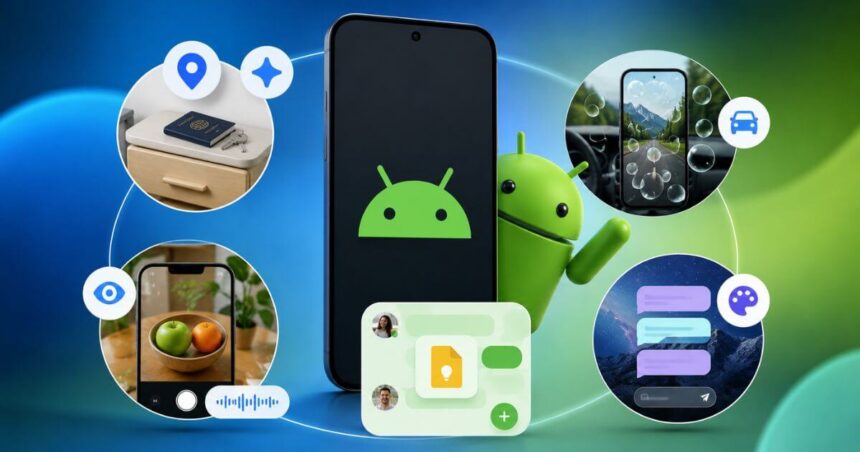
The new features include a way to remember where you kept important items, a tool designed to reduce motion sickness while travelling, and a new Gemini feature that can describe what your camera sees. Google is also making Google Messages more useful with shared Google Keep notes and customizable chat themes.
Gemini Can Remember Where You Keep Things
One of the more useful additions is coming to Gemini and Find Hub. Users will soon be able to ask Gemini to remember where they placed important items. For example, you can tell Gemini that you kept your passport in a bedroom drawer. You can also add a photo while saving the location. Later, you can simply ask Gemini where the item was kept or check the remembered items section in Find Hub.



This can be useful for things that do not have a tracking tag attached to them. Spare keys, passports and other important items can be saved this way. Google says the feature works on Android 16 and newer devices in countries where Gemini and Find Hub are supported.
Motion Assist Could Make Phone Use Easier In Cars
What if being a passenger princess 👑 didn’t come with the passenger sickness? 💅
Motion Assist is designed to help reduce motion sickness so you can finally catch up on texts and reading while in the car. pic.twitter.com/C6mK2DLzif
— Android (@Android) September 1, 2026Google is also introducing Motion Assist for Android 17 phones. The feature is designed for passengers who experience motion sickness while using their phones during a journey. Motion Assist adds a subtle bubble overlay to the screen. The bubbles move with the vehicle and are designed to help reduce the mismatch between what your eyes see and the movement your body experiences.
Users can set Motion Assist to turn on automatically or add it to Quick Settings. Google also allows users to customize the bubble’s shape, colour and opacity. This means passengers can continue reading, browsing or watching videos while travelling, although the feature is intended to help reduce motion sickness rather than eliminate it completely. Motion Assist is available on phones running Android 17.
Guided Vision Uses Gemini To Describe Your Surroundings
Another major addition is Guided vision, which works through Gemini Live. Users can share their camera with Gemini and receive spoken descriptions of what is in front of them. Google says the feature was designed with blind and low-vision communities in mind. It can help with tasks such as reading small text on a food label, understanding a menu in a dimly lit restaurant or identifying objects around the home.
The feature can also provide voice guidance if the camera is not positioned correctly. Gemini can tell the user to reframe the shot, move the camera across an area or centre an object. Guided vision can be accessed through Accessibility shortcuts, the TalkBack menu or Gemini app settings. Google says it is coming soon to phones running Android 9 and newer in countries where Gemini is available.
Google Keep Comes To Google Messages
It’s here! This month’s Android Drop has four new features to make your Android experience even better. pic.twitter.com/Yz41JUFeFM
— Android (@Android) September 1, 2026Google is also making group planning easier by bringing Google Keep into Google Messages. Users can create and edit shared notes without leaving a conversation. This can be useful for grocery lists, holiday planning or other tasks where multiple people need to contribute.
Everyone involved can view the note, make changes and add ideas. To access the feature, users can tap the + icon in Google Messages and bring Google Keep directly into the conversation. Google says the rollout starts today in Google Messages.
Google Messages Gets Custom Chat Themes
The fifth feature is more about personalization. Google Messages now lets users customize individual conversations with different backgrounds and colours. Users can select a wallpaper or use their own photo. The colours of the text bubbles can automatically match the selected background. Users can also manually change the colours.
This means different conversations can have different looks. A personal chat, family group or travel conversation can each have its own theme. Google says the Chat theme feature is available now in Google Messages.
Android September 2026 Update: Key Features
| Feature | What It Does | Availability |
|---|---|---|
| Gemini + Find Hub | Remembers where important items were placed | Android 16+ |
| Motion Assist | Adds a moving bubble overlay to help reduce motion sickness | Android 17 |
| Guided Vision | Uses Gemini Live to describe surroundings | Android 9+ coming soon |
| Google Keep In Messages | Creates and edits shared notes inside chats | Rolling out |
| Chat Themes | Adds custom backgrounds and colours to conversations | Available now |
Conclusion
Google’s September Android Drop is focused on small features that can have a practical impact on everyday phone use. The ability to remember where important items were placed could save users from searching for misplaced belongings. Motion Assist addresses a common problem for people who use their phones while travelling.
Guided vision is perhaps the most accessibility-focused addition, giving Gemini Live the ability to describe objects and text through the camera. Meanwhile, Google Keep integration makes group planning easier, while chat themes give Google Messages a more personal touch.
The update shows Google’s broader approach to Android. Instead of relying only on major interface changes, the company is adding features that fit into everyday tasks and make existing apps more useful.
Follow Us: Facebook | X | Instagram | YouTube | Pinterest