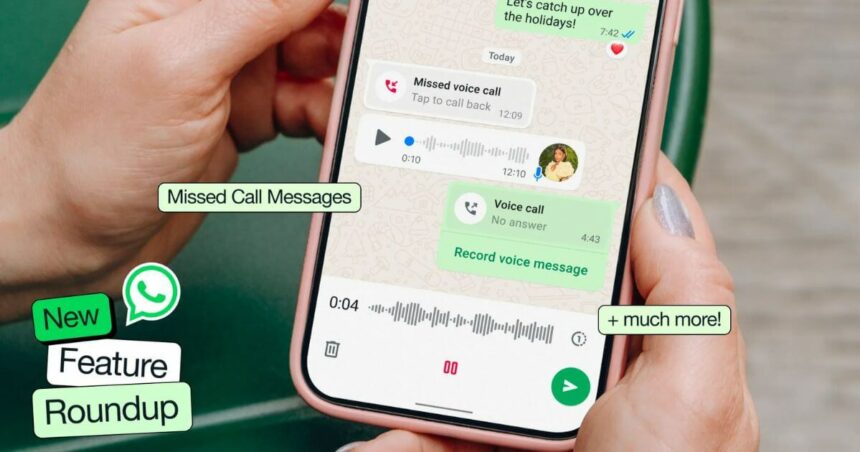
Missing calls from family or friends can be annoying. You notice the notification later and immediately start wondering what the call was about. WhatsApp has now stepped in to fix that exact frustration. With its latest update, the messaging app has introduced a feature that feels small on paper but makes a real difference in everyday communication. Along with this, several other thoughtful changes have rolled out just in time for the holiday season, when WhatsApp usage naturally peaks.
The messaging app announced these features this month. They are rolling out before the holidays, which is good timing, since most people use WhatsApp during this season to connect with relatives and friends.
Leave A Message When Calling; Go And Answer

More Read

Well, this sounds really interesting. The biggest change is called missed call messages. It is pretty straightforward. When someone doesn’t pick up your call, you can record a note for them right there.
Made a voice call? Record a voice message. Tried video calling? Leave a video note instead. One tap and it is sent. No complicated steps or extra menus to deal with. This beats the old voicemail system by miles. Remember checking voicemail? You had to dial a number, listen to instructions, press a button, and waste time. Nobody liked it. WhatsApp’s version happens inside the app, where you already spend time chatting.
Your mother called while you were at work? She can explain why in a voice note. Father tried video calling during your commute? He can record what he wants to say. You watch it later when you get free. Simple stuff, but it fixes a real problem. Think this will kill voicemail completely? They might be onto something.
React Without Interrupting Calls
Group voice calls got a small but useful addition. You can now drop reactions like cheers while someone talks, without cutting them off.
Anyone who has been in a group call knows the problem. Someone is talking, and you want to agree or show support. But interrupting feels rude, and waiting might mean you forget to respond. These reactions sit on screen for everyone to see without stopping the conversation. It is a minor thing, but it makes the call feel less awkward and more natural.
Video Call Highlight: Who Is Speaking?

Video calls with multiple people can get messy. Three or four people on screen, and you are not sure who just spoke. The update fixes that problem automatically by focusing on the active speaker.
Whoever talks gets priority on your screen. Everyone else stays visible, but smaller. Your eyes don’t have to hunt around to figure out who is speaking. This works great for family calls with many people or work meetings where you need to follow discussions closely.
Better AI Image Creation
WhatsApp uses Meta AI for creating images. The technology behind it just got upgraded with new tools, similar to Flux and MidJourney. According to WhatsApp, the quality jump is significant.
What does this mean, practically? When you ask the AI to make an image, it looks better now. More detailed. More polished. The company specifically mentioned holiday greeting cards since that’s what people create this time of year.
Need a custom birthday card? A special holiday greeting? Describe it, and the AI generates something decent. You don’t need Photoshop skills or design knowledge. Just type what you want.
The timing makes sense. Holidays mean more greetings, more cards, and more reasons to create images. WhatsApp wants people to use their AI instead of other apps.
Turn Photos Into Moving Videos
Now that’s interesting. You can take any regular photo and animate it into a short video. Not just adding text or stickers, but actual animation, where parts of the image move.
Got a photo of a beach? Make the waves move. Picture of a campfire? Animate the flames. No scene? Add falling snowflakes. You tell the AI what to animate, and it handles the technical work.
This is not some basic filter effect. The AI creates a genuine short video from still images based on your instructions. People who post lots of status updates will probably love this since animated content grabs more attention than static photos.
The barrier to entry is zero. No video editing software, no tutorials, no learning curve. Upload a photo, say what you want animated, and you’re done.
Desktop Gets An Organization Feature
The desktop version of WhatsApp added a media tab. All your documents, links, and media from different chats get organised in one spot.
Searching through old conversations for the PDF file someone sent? The media tab makes it faster. Everything is categorised and accessible without endless scrolling. Link previews have improved, too, showing you more information before you click through.
Desktop users probably requested this. When you are working on a computer, finding files quickly matters more than on mobile, where you are just casually browsing.
Now Status Updates Get An Interactive Element
Your WhatsApp status can now include music, lyrics, interactive stickers, and questions. The lyrics feature lets you share what song matches your mood. Stickers make things visually interesting.
Questions are the standout addition, though. Post a question on your status, and contacts can respond to it. It turns your status from a broadcast into a conversation starter. Ask friends for restaurant recommendations, movie suggestions, or anything else. They respond, and you get multiple opinions fast.
Why Does This Matter?
WhatsApp has over two billion users. When they add features, it affects how millions of people communicate daily. These aren’t revolutionary changes, more like fixing small annoyances and adding convenience.
The missed call feature solves actual frustration. Image tools let people create content easily. Better video calls make remote conversations clearer. Each update addresses something users have complained about or requested.
Meta clearly wants people to spend more time on WhatsApp instead of switching to other apps for certain tasks. Need to create images? Stay on WhatsApp. Want animated content? WhatsApp does that now. Missed a call? Handle it in the same app. Well, this smart strategy is clearly sensible.
Conclusion
These updates won’t change your life, but they will definitely make it easier and WhatsApp usage a bit smoother. The missed call message feature alone fixes a problem that millions of users deal with regularly.
Whether you are coordinating holiday plans with family, staying in touch with friends, or managing work chats, at least one of these features will come in handy. Rolling them out before the holiday season is smart timing from the WhatsApp team.
Update the app when it becomes available and try the new features. Some will stick, some you might ignore, and that’s perfectly fine. Having more useful options is always better than having none.
Follow Us: Facebook | X | Instagram | YouTube | Pinterest