Smartphones today carry everything. Banking apps. OTPs. Private chats. Work emails. And now, AI-driven personalisation makes even more sensitive data visible on-screen. That is exactly where the Samsung Galaxy S26 Ultra steps in with something different. Samsung has introduced a new Privacy Display feature on the Galaxy S26 Ultra.
This is not a screen protector. It is not a software blur trick. It is a hardware-level solution built directly into the display. At the core of it is something Samsung calls Flex Magic Pixel technology. Let’s break it down in simple words.
What Is Privacy Display On Galaxy S26 Ultra
Privacy Display on Samsung Galaxy S26 Ultra 🤯#Samsung #SamsungUnpacked #GalaxyS26Ultra #PrivacyDisplay pic.twitter.com/DG81lzJPf7
— Techotales (@techotales) February 26, 2026More Read

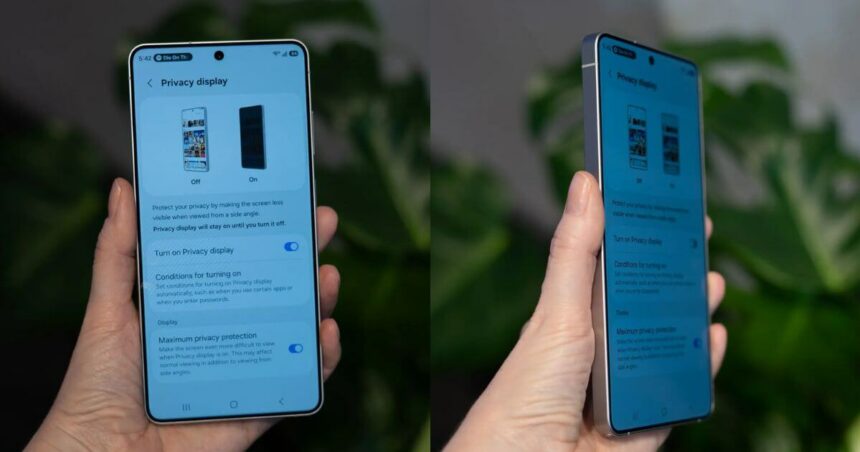
Privacy Display is a built-in screen feature designed to control how light is emitted from pixels. The aim is simple. Restrict visibility from side angles without compromising the viewing experience for the user.
When the feature is turned off, the display behaves like a regular flagship AMOLED panel. You get full brightness. Full colour accuracy. Wide viewing angles. When turned on, side viewing angles are significantly restricted. Someone sitting next to you will struggle to read what is on your screen.
This is especially useful in public places like airports, metro trains, offices, and cafés. Unlike traditional privacy screen protectors that reduce brightness and distort colours, this solution is embedded inside the display panel itself. That is the biggest difference.
Smart Privacy Controls And Customization
Samsung has not made it just an on-and-off toggle. Users can control when Privacy Display activates. You can set it to turn on automatically when entering a PIN, pattern, or password. It can also activate while opening banking apps or messaging apps.
That means your screen stays normal most of the time. But the moment sensitive content appears, privacy mode kicks in. There are also adjustable privacy levels.
Partial Screen Privacy limits visibility for selected on-screen elements like notification pop-ups. Maximum Privacy Protection restricts side-angle visibility more aggressively for full-screen privacy.
Samsung says the feature works in both portrait and landscape orientations. And importantly, it has minimal impact on battery life.
How Flex Magic Pixel Technology Works
Now comes the interesting part. Samsung calls the core technology behind this feature Flex Magic Pixel. It works at the pixel level. Not at the software layer. Not as an external film. Inside the display panel, Samsung uses a combination of narrow and wide pixels. When Privacy Display is off, the system primarily uses wide pixels. These disperse light across broader angles. That is why you get consistent brightness and colours from different viewing positions.
When Privacy Display is enabled, the display switches to narrow pixels. Narrow pixels are engineered to control how light spreads from the screen. They limit horizontal light dispersion. So the content remains clear and bright for the person directly in front of the screen. But it becomes hard to read from side angles.
In simple terms, the screen changes the direction of light flow. Because this system works at the pixel level, Samsung claims it preserves overall display quality. You do not get the dimming effect seen with privacy screen protectors. You also avoid colour distortion. It is precision engineering inside the display stack.
Why This Matters In 2026
With AI features becoming smarter, smartphones now display contextual suggestions, OTP previews, AI summaries, and sensitive notifications on-screen. The more helpful AI becomes, the more private data appears on your display.
Privacy Display adds an extra layer of protection without forcing users to compromise on clarity or brightness. It is also one of the first times we are seeing a hardware-integrated privacy display solution in a mainstream flagship smartphone. For power users, this is a practical feature. Not a marketing gimmick.
Samsung Galaxy S26 Ultra Full Specifications
| Category | Details |
|---|---|
| Display | 6.9-inch Dynamic AMOLED 2X, 3120 × 1440 resolution, 120Hz, 10-bit colour, Privacy Display |
| Protection | Corning Gorilla Armor 2 |
| Processor | Snapdragon 8 Elite Gen 5 for Galaxy |
| RAM | 12GB / 16GB |
| Storage | 256GB / 512GB / 1TB |
| Software | One UI 8.5 based on Android 16 |
| Rear Camera | 200MP (OIS) + 50MP Periscope (5x) + 50MP Ultra-Wide + 10MP (3x) |
| Video | 8K Recording, HDR10+, Super Steady Video |
| Front Camera | 12MP with 4K video |
| Battery | 5,000mAh |
| Charging | 60W Wired, 25W Wireless |
| Connectivity | 5G, Wi-Fi 7, Bluetooth 6, NFC, USB Type-C |
| SIM | Nano SIM + eSIM |
| Navigation | GPS, GLONASS, Galileo, QZSS, BDS |
| Sensors | Gyroscope, Accelerometer, Barometer, Proximity, E-Compass, Fingerprint |
| Dimensions | 163.6 × 78.1 × 7.9mm |
| Weight | 214g |
| Colours | Black, Blue, Purple, White |
Samsung Galaxy S26 Ultra Price In India And Availability
Samsung has priced the Galaxy S26 Ultra in the premium flagship zone.
The 12GB + 256GB variant costs Rs. 1,39,999.
The 12GB + 512GB model is priced at Rs. 1,59,999.
The top 16GB + 1TB version comes at Rs. 1,89,999.
Conclusion
The Privacy Display on the Samsung Galaxy S26 Ultra is more than a gimmick. It is a thoughtful response to how smartphones are used today.
Flex Magic Pixel technology works at the pixel level. It changes how light spreads. It protects your screen without ruining display quality. And most importantly, it does not force you to stick a dark film on your phone. In a world where AI keeps pushing more personal data onto our screens, this kind of innovation makes sense. Privacy is no longer optional. Samsung just made it smarter.
Follow Us: Facebook | X | Instagram | YouTube | Pinterest